YouTube automatically translating video titles can be frustrating. Below is a straightforward guide on how to turn off YouTube title translation.

Is YouTube translating video titles into languages that confuse you? This often occurs due to incorrect location or language settings in YouTube, your Google account, or your device. Using a VPN while browsing YouTube may also cause this issue.
But don’t worry! This article will provide you with effective solutions to turn off automatic translation of video titles and descriptions on YouTube.
How to Turn Off YouTube Title Translation
- Preliminary Tests for YouTube
- Check Issues with the Video
- Switch Language on YouTube
- Switch Location on YouTube
- Change Language in Browser
- Change Language on Mobile Device
1. Preliminary Tests for YouTube
- Refresh the YouTube page in your browser or the app on mobile.
- Close all browser tabs and reopen YouTube to eliminate temporary errors.
- Disable VPN on your browser or mobile device if active.
- Disable any translation extensions installed on your browser.
- Turn off any translation keys active on mobile devices.
- Clear your browser cache to avoid conflicts.
If these checks do not resolve the issue, proceed with the methods below.
2. Check Issues with the Video
The content creator may have intentionally used a specific language for the video title. Verify if this issue is isolated to one video or multiple videos from various channels. If other videos appear in a language you're accustomed to, then it’s likely a content-specific issue.
If you find that many videos are in a different language, apply the following methods:
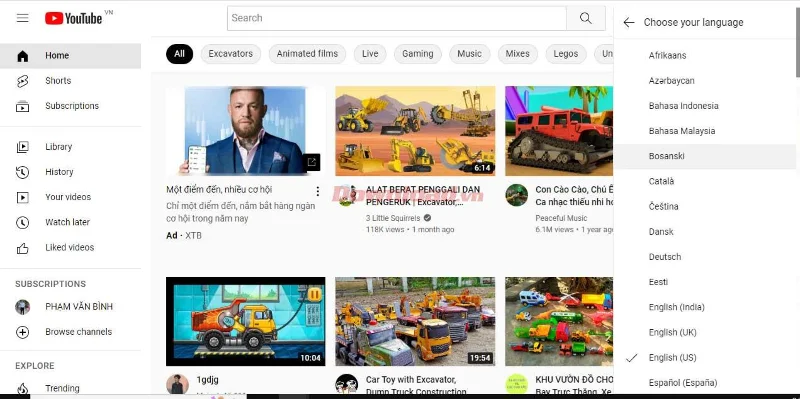
3. Switch Language on YouTube
If you have modified the language setting in YouTube, it might explain the translation issue. Here’s how to revert to your preferred language:
- Open YouTube.
- Click on the icon resembling a globe in the top right corner.
- Select Language from the drop-down menu.
- Choose your preferred language from the list (select English if needed).

Please note that mobile users may not see the option to change language on the app, as it follows the device’s language settings.
4. Switch Location on YouTube
Changing your location settings can also impact video title translations. Follow these steps for desktop:
- Open YouTube.
- Click on your avatar in the top right corner.
- Select Location.
- Pick your desired language, like English.
For mobile devices, the process is similar:
- Open the YouTube app.
- Tap your avatar in the top right corner.
- Go to Settings > General.
- Select Location and choose your country.

5. Change Language in Browser
Ensure the language settings in your web browser are set correctly according to the developer's specifications, as selecting the wrong browser language may prompt YouTube to display translated titles.
6. Change Language on Mobile Device
YouTube on mobile aligns with your device's language settings. Changing it could halt the translation of titles:
To Change Language on Android:
- Open Settings on your Android device.
- Navigate to General management > Language and input.
- Tap Language.
- Select your preferred language or add a new one as needed.
To Change Language on iOS:
- Open Settings on your iPhone.
- Tap General.
- Select Language & Region.
- Tap iPhone Language and choose the desired language.
By changing your device's language settings, YouTube will automatically use the correct language and cease translating titles.
Conclusion
These are some of the simplest solutions to disable YouTube title translation. We hope this guide helps you enjoy a more personalized and enjoyable YouTube experience.
For additional tips on using YouTube effectively, feel free to explore related articles on YouTube settings.










Ricky The Biker -
Such a useful post! Now my recommendations won't be muddled with translations anymore. Thanks a ton
Martina Grace -
I totally agree with you! The translations can be annoying. Glad there’s a solution
Richard 99 -
Thank you for this. I’ve been struggling with YouTube’s settings for too long
Sara lou -
You made my day! Finally, I can watch videos without those irritating translations
John Smith -
Great post! Disabling title translation on YouTube has been a challenge for me. Your guide made it super easy. Thanks
Leo L. -
Big fan of your posts! Keep it coming! This one was specially useful
Alex T. -
Okay, I’m convinced! I’m turning off title translations now. Wish me luck!
Susan G. -
Can you make a video tutorial for this? Sometimes I learn better with visuals!
Lily 101 -
Your tips are spot on! I never knew those settings existed.
Linda Flowers -
Funny how something so small can be so annoying! Grateful for this step-by-step guide!
Hannah P. -
This needs to be shared more! Great tips for all YouTube users who find title translation annoying
Charlie Dog -
Hahaha! I thought I was stuck with those translations forever. So glad I found this!
Boop the Snoot -
I love this! Turning off title translation really clears up my YouTube experience
Alfredo 789 -
This is super helpful. I hope others find it as useful as I did
Patty Cake -
Honestly, who needs translations when there is already so much content available? Appreciate the help
Lisa Stark -
Epic guide! Disabling that translation is great for when I’m focusing on particular content!
Daisy Hudson -
Been looking for this info forever! You have no idea how much this helps
Max Thompson -
I agree! Sometimes the translations are just unnecessary noise. Glad there’s a way to turn it off
Anna Sunshine -
Wow, thank you! I never knew how to turn off title translation before. Now I can focus on the content
Jameson 22 -
Finally, some good news for all those title translation haters. Thank you
Kevin K. -
Your article helped me so much! I was really confused by the settings but you made it clear
Bruce’s Buddy -
This was so informative. I can't wait to try it out! Thank you
Ahmad Y. -
Thanks for sharing this! I always thought those translations were stuck forever. Easy and clear instructions
Emma White -
Question: Does turning off title translation also affect subtitles? I’d love to know before I change any settings
Jessica 123 -
Are you sure this method works for mobile apps too? Would love to have the same settings on my phone
Sammy Tech -
Would love to see more tips like this! There's always something new to learn!
Kathy Jones -
I really appreciate this! I’ve been wanting to turn that off for ages
Tommy the Cat -
Why would anyone want to turn off title translation? It helps me understand content from different languages
Michael Lion -
Turning off translation is a game changer! My viewing experience just got way better.
Hazel F. -
This feature confused me for a long time! Thank you for breaking it down
Ann Tiddles -
Hilarious that it took me this long to find out I could turn them off! Thanks
Milo's Master -
This is the best thing I’ve read all week. Thank you for this helpful guide
Emma R. -
I love how simple this was to follow. Thanks for making it easy for us!
Vicky V. -
Imagine not having to see those translations! Excited to see how my experience improves.
Jamie C. -
This is the easiest guide I’ve encountered! Really appreciate your help!
Sarah Lee -
Can’t believe I found a solution to this annoying feature! Your article is a lifesaver!
Oliver W. -
For anyone reading this, just know that you can also customize your YouTube preferences. The guide really helped
Greg 83 -
Thanks for the clarity! I often get confused with settings, but yours were spot on
James V. -
I shared this article with my friends who are also struggling with similar issues. Appreciate your work
Lucy Brown -
I’ve been struggling with this for a while. Your tips really helped! Now I can enjoy videos without those distracting translations.
Nina Sky -
Awesome! Finally can enjoy videos without those annoying translations!